
This website is invaluable for many people. It provides reliable information on how to look for their ancestors in the area of current or former Poland. I recently wrote about Eastern Poland. This article will focus on the search engine of the Pomeranian Genealogical Society. This is the main tool for searching in Northern Poland.
The area covered by the database
The PTG search engine is the most important tool for searching for ancestors in the current Pomeranian Voivodeship. It should not be confused with the Polish Genealogical Society. The abbreviation is the same, but the search engine of the Polish Genealogical Society is the famous Geneteka. The PTG also serves the northern part of the Kuyavian-Pomeranian Voivodeship and the eastern part of the West Pomeranian Voivodeship. And a piece of Greater Poland.
Most of you will understand better when I write. I am talking about the area of former West Prussia (West Preussen). It includes the eastern part of Pommern and the northern part of the Posen province.

Pomeranian Genealogical Society SEARCH ENGINE

The Pomeranian Genealogical Society has been operating for almost 20 years. During this time, its members indexed most of the church books and civil status records from the above-mentioned area.
As of January 15, 2024, this portal has completely changed.
For those who have already encountered it, it will be a great surprise. Not always nice. For people who want to start using it, an introduction will certainly be useful. Information found on the Internet is completely out of date.
After so many years, it became obvious that the old search engine lost technical support. Thus, it was necessary to change it. For now, some of the functions known and useful from the earlier version are missing.
First of all, there is now no English version of the search engine. Initially in January it was, so you can familiarize yourself with this form during my presentation. Nonetheless, a few days ago I noticed that the translation had disappeared.
This was the reason that I decided to show the search engine using its basic, Polish version too. This will give you the opportunity to compare.
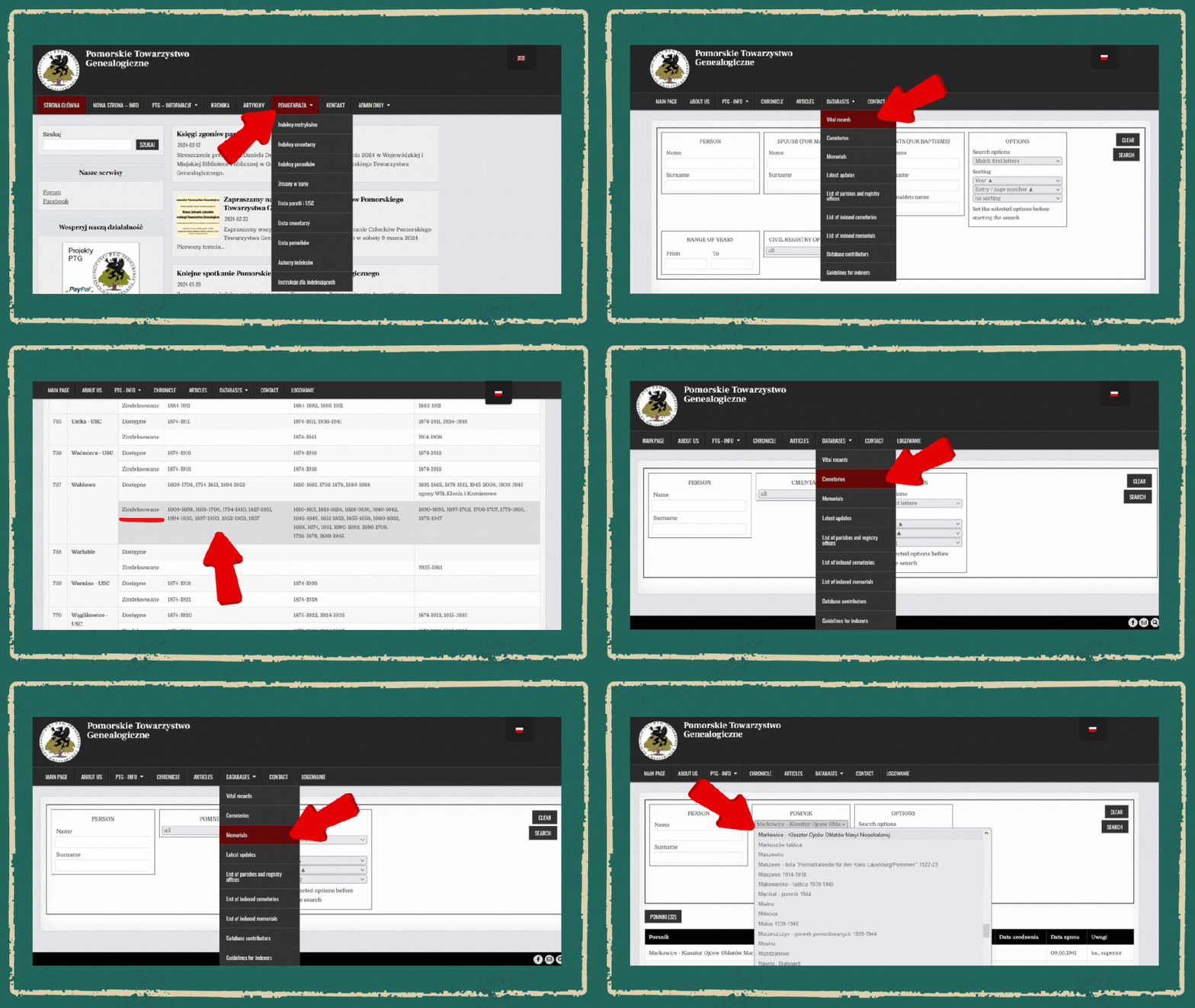
There is no map of indexed parishes and the Civil Registry Office. The list of these is not active. It does not redirect to information where the given books are stored. Nevertheless, you can find out what range of existing books have been indexed there.
There are three search engines provided. Additionally to the basic search engine in record books, there is a search engine for names from cemeteries. There is also one for names from memorial sites (monuments). Hence, they offer a chance to find records from the 20th century. These records can’t be obtained from documents due to legal regulations.
Nevertheless, these two databases also cover places that lie far beyond the area designated for the main database. You can find records from the cemetery in Zbaraż (Ukraine) or the memorial site in Oświęcim. It is a rather random set. It can, of course, be checked. Still, a useful result is rarer than winning the lottery.
Furthermore, many records are already in other databases, so it’s a pity that the same work was repeated once again
How to conduct a search
In the current version of the browser, we enter all search data in one form.
Nonetheless, it has a certain division that must be remembered. The first block refers to the person you are looking for. First, enter your name and surname. Next, specify the date range. The database displays a limit of 300 results for the type of event. We can also limit the results to the specific parish or registry office we are interested in.
We have 4 options for search types – Match First Letters, Match Exactly, Match Fragment and Soundex DM. It’s best to use all options. This strategy provides a greater chance of finding the result that interests us.
Some of them will, of course, overlap. For names that have differences in spelling or have been pronounced differently, this is the best choice. There is also another, technical reason for that search.
The search engine does not respond to the Enter keyboard command. You always need to press the Search button with the cursor. Using all 4 options helps reduce the need to write similar name variants. It minimizes differences between them.
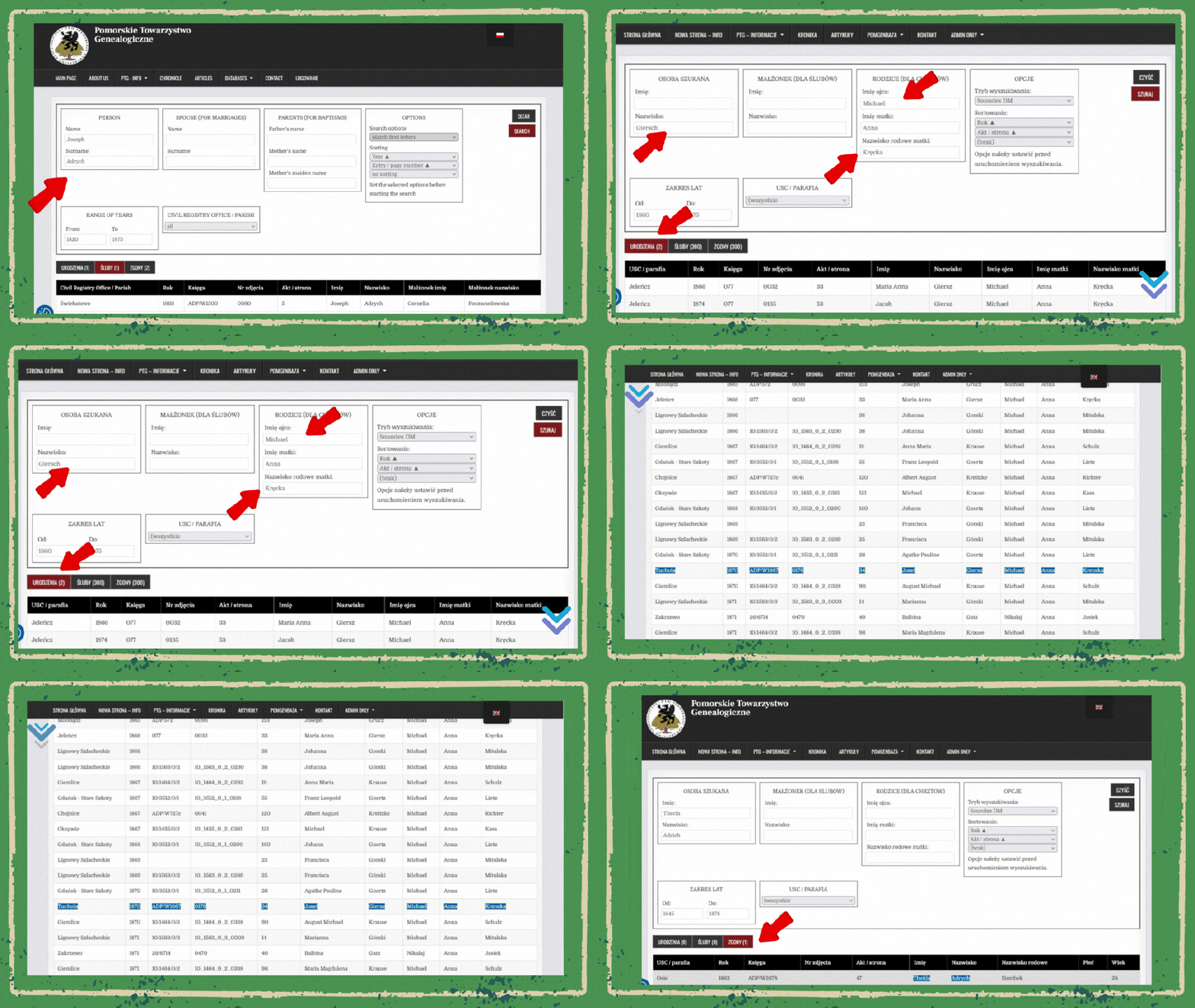
For example – I was looking for a couple: Michael Giersch and Anna Kręcka.
For a wedding:
Enter the spouse’s surname and first name in the first column PERSON (Michael Giersch). In the second column, SPOUSE (FOR MARRIAGES), enter the name and surname of the spouse. For example, enter Anna Kręcka.
The correct result was given in options 1, 2 and 3, but it is completely absent in choice 4.
For a baptism.
We leave only the surname in the first field. We delete the data from the second field. We enter the father’s name in the third field PARENTS (FOR BAPTISM). We also enter the mother’s name and maiden name. For example, Michael and Anna Kręcka.
And here, in turn, none of the first three options returned any result. But, the Soundex choice gave two correct results, because the father’s surname was written in Polish – Giersz.
Is this all? No.
Sometimes it is worth reducing the amount of data entered. After removing the mother’s maiden name, Soundex returned 37 results. Most of them are obviously useless. Still, now three of them match our search. In one case, the mother’s surname is in a changed form. This often depends on pronunciation.
Searching also depends largely on what we enter. We don’t know the original spelling. Sometimes the absence or excess of one letter is enough that some options will not work. That’s why it’s worth checking all the possibilities.
When searching for Tekla Adrych’s death, I entered the data as it was written in the marriage certificate. Next time, only the choice Soundex found her death certificate. Both the name and surname were spelled (slightly) differently. This is enough for the rest of the options not to work.
How to find out where the original document is
Once we get some interesting results, we’d like to get to the original records. The index does not offer exact dates. It does not include the names of godparents or wedding witnesses. It also lacks notes on who remained from the deceased’s family.
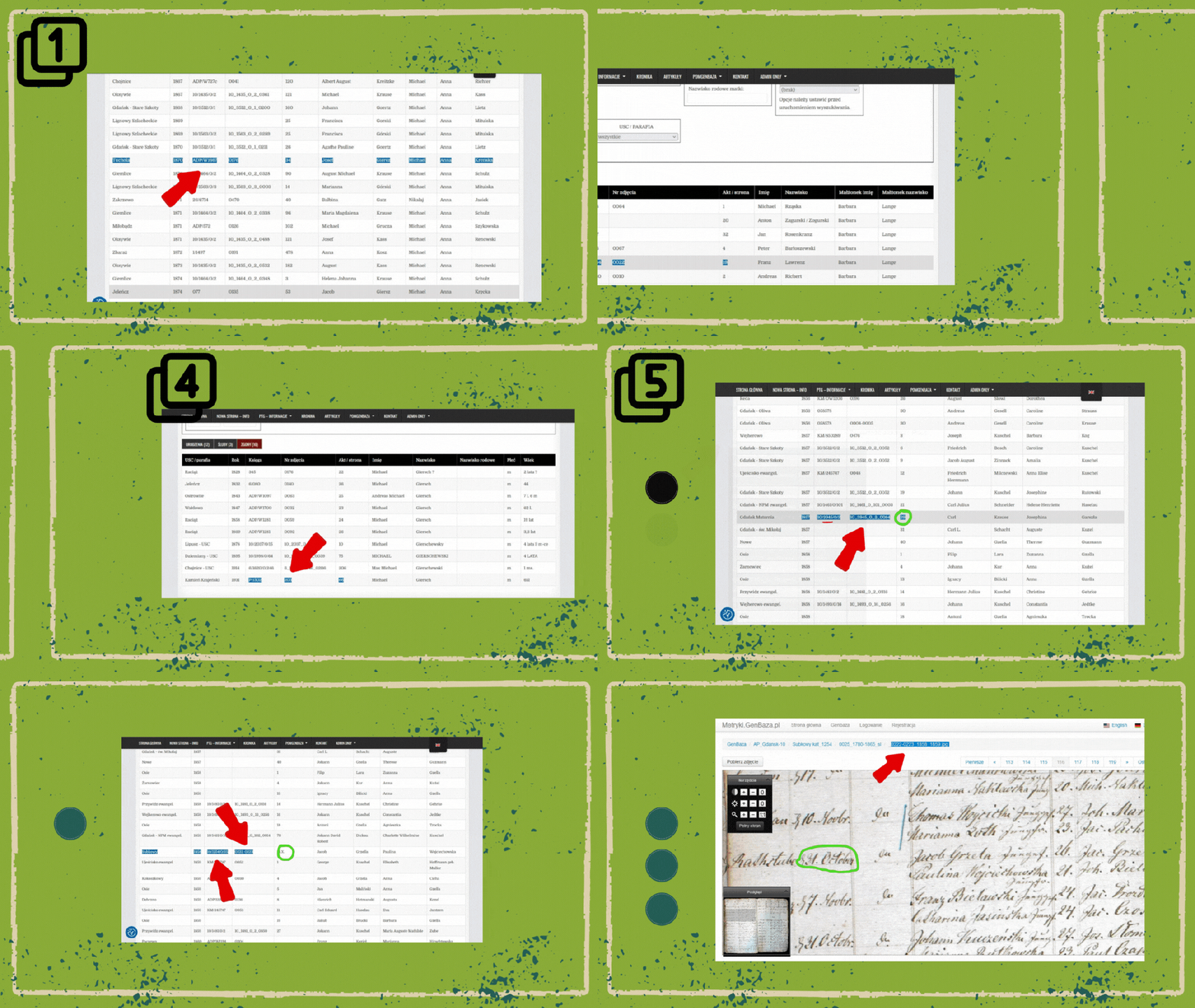
Indexes show in the Book column (Księga) the designation where a given entry was indexed. Unfortunately, this is written in a type of code. You simply need to know this code to find out where to look for a given book.
There are a few of them:
- ADP – Diocesan Archives in Pelplin. The numbers in the Book column give its number. Next column – Photo number: provides the scan number. The next column – Act/page lists the record number or the page number of the original record.
- AAG – Archives of the Archdiocese of Gdańsk. Like above.
- KM – this designation takes us to familysearch.org. The numbers after the abbreviation show the microfilm number. Sometimes these are old markings. All you need to do is simply search for a photo using the indexation data. And you must remember that some of these films are only available at the Family History Center.
- P – the index was made when the book was still in the parish office. Now, it should be in one of the above church archives.
- Additionally to entries marked with letter abbreviations, there are others consisting only of numbers. Basically, they mean that a given scan can be found on the MetrykiGenBaza portal.
Ad. 5
- In the field Photo number (Nr zdjęcia), look for a sequence of numbers separated by underscores. This sequence provides the exact identification of the scan on this website.
- You should go to https://metryki.genbaza.pl/index/list and enter the name of the parish in the search box. Hints are displayed starting from the third letter.
- Enter the name of the parish or registry office. Select the appropriate date range. Then find a specific scan.
- On the scan, find the entry number entered in the Act/page (Akt/strona) column.
Concluding remarks
Besides simply searching for names, you can view data from a specific parish or registry office. Personally, I often do this, of course not for all records from a given place. But if I suspect that in the next few years a baby will be born, I check the entire list. It turned out more than once that the search engine did not detect the spelling of a given name.
Search engines for cemeteries and memorial sites work similarly. You can search by name. Alternatively, you can search a given cemetery or memorial site. Nevertheless, you should know that these search engines do not only refer to the area that I indicated. Some cemeteries are not even within Poland’s borders. Unfortunately, it is not possible to figure out in what area a given cemetery or memorial site is located. It would just be useful to have a map of these places, maybe it will be done in future. At least some of this data is unique: it is not found in any other database. So, it is worth remembering this when searching for ancestors from current Poland or its former territories.
To sum up – despite its shortcomings, the PTG database and data search engine is very useful. It is a valuable tool for searching for ancestors who came from Gdańsk Pomerania and surrounding areas.
Maybe you have any questions related to the presented database or searches in Northern Poland. If so, please write to me at the email: askforgenealogy@gmail.com
If you are interested in finding ancestors in Poland, subscribe to this blog. Then you will not miss information that is useful to you.
Like this article and share it with your friends.
*Correction after a year – there are two language versions of the search engine: English and German.
 ASK LIDIA